 English
 Русский
When you use public Wi-Fi or work remotely, your data is vulnerable to prying eyes and at risk. Hackers, advertisers, and even internet service providers (ISPs) can track your online activities, collect personal information, and compromise security. This is where a virtual private network (VPN) comes to the rescue.
According to Statista data, 23.1% of users worldwide use VPN. According to Surfshark estimates, more than 1.6 billion people use secure connections. Virtual private networks are popular not only among individual users. A significant majority of organizations — 93% — use VPN to protect confidential data and ensure secure remote access for employees.
How does a VPN work and how does it protect data and internet activities? This comprehensive guide covers everything you need to know about VPN: from history and different types to technical details of encryption protocols and step-by-step setup instructions.
How VPN Works
VPN is a secure network tunnel that encrypts internet traffic and ensures privacy online. By routing traffic through VPN servers located in different parts of the world, the service masks the user's IP address and encrypts all transmitted data in real-time. A VPN channel represents secure data transmission protected from external threats such as traffic interception and manipulation. Additionally, a secure connection prevents internet providers from tracking and intercepting online activities.
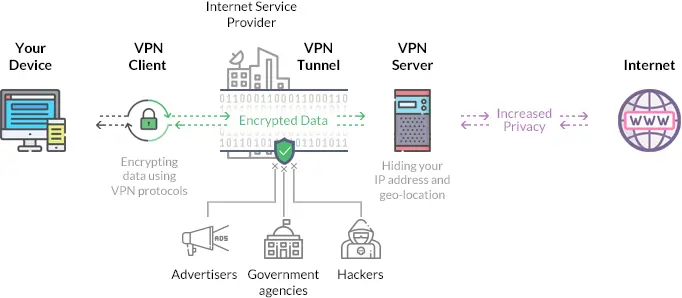
The infographic illustrates the VPN operation scheme:
- visitor;
- VPN client — encrypts data using VPN protocols;
- VPN tunnel — through which encrypted data passes;
- VPN server — allows hiding the IP address;
- internet.
History of VPN
Before the advent of VPN, organizations relied on dedicated lines and dial-up connections for private communication. One of the earliest concepts resembling VPN was packet switching, which allowed data to be transmitted in small, manageable blocks over a shared network. However, this technology left data vulnerable to tracking and interception by third parties.
The first true VPN technology was developed by Microsoft in 1996, when a team of engineers created the PPTP (Point-to-Point Tunneling Protocol). The protocol allowed users to establish encrypted connections over public networks.
By the early 2000s, VPNs were mainly used by companies for secure remote access to internal systems. Nevertheless, the rise of cyber threats and data breaches spurred interest in the technology beyond corporate use.
Advantages of VPN Connection
A VPN service ensures that your information remains confidential and protected from malicious actors — hackers and cybercriminals. VPN also enhances anonymity by masking your IP address and location, preventing websites, advertisers, and ISPs from tracking your browser activities. Without VPN, providers can collect and sell data to third parties, exposing users to privacy violations.
Thanks to VPN, remote workers can safely access company resources. In many organizations, connecting via VPN is a mandatory requirement for accessing corporate networks, ensuring encrypted communication and protecting internal data.
VPN Limitations
Some VPN providers can see user activity unless they adhere to a strict no-logs policy. Websites continue to collect data using cookies, browser fingerprints, and tracking scripts.
It's worth noting that VPNs do not work as antivirus software, although some services have malicious website blocking features. They do not scan or remove malware, so using antivirus programs is still necessary.
Free services carry a number of risks. Lack of security checks and certification leads to data leaks, and privacy policies may contain clauses allowing services to collect and transfer data to third parties.
Additionally, there are free VPN programs with built-in malware. The largest botnet in history, 911 S5, infected 19 million Windows computers worldwide. Infected devices were turned into proxy nodes that attackers used for cybercrimes.
Reserve infrastructure to improve fault tolerance
Types of VPN Services
VPNs serve different purposes for companies and individuals. Let's look at the main types of VPN and their functionalities.
SSL (Secure Sockets Layer) VPN uses web HTTPS protocols to establish secure connections between the user's device and the VPN gateway. SSL works through a web browser, does not require additional software installation, and is popular for its ease of use. Companies with remote employees choose them for secure access to internal networks.
Client-Server VPN allows users to securely connect to a private network by encrypting all transmitted data. Remote employees get secure access to company resources, confidentially even in unsecured networks. This technology requires client software and may introduce delays depending on server location.
Site-to-Site VPN is used to create secure connections between two or more geographically dispersed networks, reducing the need to install separate clients. Companies with multiple offices or branches often use it to organize a geographically distributed private network.
Intranet VPN protects internal communications within a company. Intranet works similarly to site-to-site VPN but is limited to the organization's internal network.
Extranet VPN extends secure network access to external partners, suppliers, and clients without exposing the entire internal network. Companies use this system for secure collaboration with third parties. Extranet requires careful access management to prevent data leaks and carries security risks if external partners do not follow best practices.
Mobile VPN is designed for user gadgets. The connection works even when switching Wi-Fi or switching to mobile data, ensuring constant protection, but consumes more battery power and bandwidth. Mobile VPNs may have lower connection speeds compared to traditional ones.
VPN Protocols
Secure connections work using VPN protocols, each offering different levels of security, speed, and compatibility.
OpenVPN
A popular protocol that uses SSL/TLS encryption to protect the connection between the client and VPN server, ensuring secure data transmission. OpenVPN supports AES-256 encryption, which allows choosing between UDP for faster operation and TCP for more reliable connections.
Thanks to its open-source code, OpenVPN is constantly improved by the community, making it a highly customizable solution. However, setup can be complex, and it may run slower than newer protocols like WireGuard.
SSTP
Developed by Microsoft, this protocol uses SSL/TLS encryption over port 443, which is also used for HTTPS traffic. SSTP uses AES encryption to protect data, ensuring reliable protection against cyber threats.
The main advantage is built-in integration into Windows, simplifying deployment for users in Microsoft environments. However, closed-source code limits transparency and support for non-Windows devices.
IKEv2/IPSec
A stable protocol designed for users who frequently switch between networks. It uses Diffie-Hellman key exchange for authentication and applies AES-256 encryption for secure data transmission.
One of the key advantages is the ability to automatically restore connection after interruption, which is convenient for mobile users. However, it is not as widely supported as OpenVPN.
L2TP/IPSec
L2TP/IPSec combines Layer 2 Tunneling Protocol and AES-256 encryption for enhanced security. The protocol is often used when OpenVPN is unavailable, but its dependence on UDP port 1701 makes it susceptible to firewall restrictions.
The protocol uses double encapsulation, which increases security but negatively affects connection speed. Despite this, L2TP/IPSec remains a widely supported protocol and is often included in built-in VPN clients of various operating systems.
PPTP
PPTP is one of the oldest protocols, originally developed by Microsoft in the 1990s. It is known for its high connection speed but is considered insecure by modern standards, as 128-bit encryption is vulnerable to attacks.
Despite easy setup and compatibility with almost all devices, security shortcomings make it unsuitable for protecting confidential data. It is recommended for use only for basic low-risk applications.
WireGuard
A modern VPN protocol with the ChaCha20 encryption algorithm, which provides faster encryption than AES-256. Thanks to a minimal codebase of less than 4,000 lines, WireGuard is lightweight, reducing potential vulnerabilities in the security system.
Operating over UDP protocol, it provides higher performance than TCP-based protocols. Additionally, it is integrated into the Linux kernel for seamless operation. As a relatively new protocol, WireGuard has not yet gained as wide support as OpenVPN. It also lacks built-in obfuscation features for bypassing restrictive networks.
Characteristics of a Quality VPN
A quality VPN goes beyond basic encryption, ensuring security, privacy, and seamless internet operation. Below are the characteristics of an ideal VPN connection.
Strong protocols for reliable encryption. Encryption protocols such as OpenVPN, WireGuard, and IKEv2/IPSec effectively protect data and maintain speed. Outdated protocols are vulnerable, such as PPTP.
IP address protection for maintaining anonymity. VPN hides the user's real IP address to prevent tracking and ensure privacy. Leak protection is necessary even if the connection is unexpectedly interrupted.
Multiple servers in different locations. VPN improves performance and access by offering servers in different countries. More servers reduce congestion, increase speed, and help bypass geographical restrictions.
Zero-logs policy. Providers must follow a strict no-logs policy to avoid storing data about page views.
Kill Switch for continuous protection. The switch prevents accidental data leaks when the connection drops. Internet access is immediately blocked until a secure connection is restored.
Mobile device compatibility. VPN should support mobile devices with apps for iOS and Android for secure connection on cellular networks.
Flexible authentication. VPN enhances security with multi-factor authentication (MFA), requiring additional verification. Biometric scans, one-time codes, or hardware tokens also help prevent unauthorized access.
Reliable customer support. Providers should offer prompt customer support to quickly resolve technical issues, and knowledge bases will help users effectively troubleshoot problems.
Paid plans for better experience. VPN with paid tariff plans provide more reliable encryption and high speed. Free services are associated with security risks and slow performance.
How to Deploy a VPN Server
If you need personal online security, network protection at the company scale, or a VPN based on a dedicated server, this chapter describes various setup methods.
VPN Provider Services
After choosing a provider, you need to install the VPN client on your device. Clients are available for popular operating systems and mobile platforms. After entering credentials, you can select a server, for example, connect to the nearest location to increase speed or choose a server in another country to bypass geo-restrictions.
In addition to devices, providers offer extensions for popular browsers. They encrypt only browser traffic, not affecting other applications on the device. To use, install the extension through official app stores, enter credentials, and select a server.
VPN Router
Instead of configuring VPN on each device, you can configure it directly on the router. This method is best suited for users who need protection for all devices on a home or office network. All connected devices will use VPN without separate installations.
Steps to configure VPN on a router.
Check router compatibility — devices with OpenVPN support are suitable (e.g., ASUS, Netgear, Linksys, TP-Link).
Log into the router's admin panel (usually at 192.168.1.1). Go to the VPN Client or OpenVPN Setup section (depends on the router).
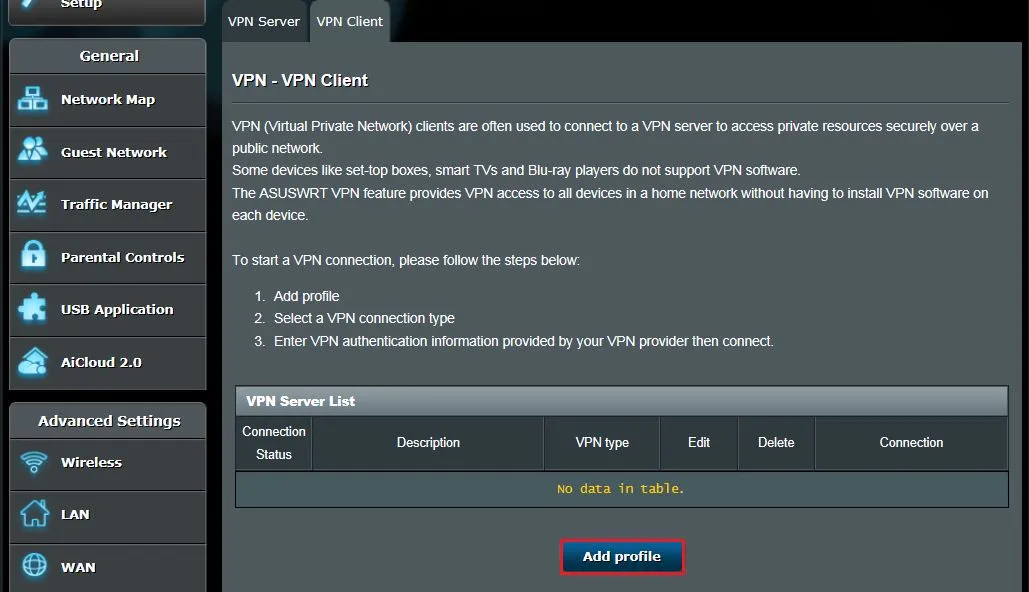
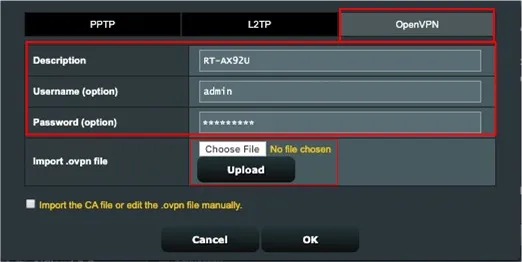
Select the connection type, enter authentication information and configuration files, such as OpenVPN or WireGuard (.ovpn or .conf). The provider supplies this data.
Setting up VPN with Servercore Infrastructure
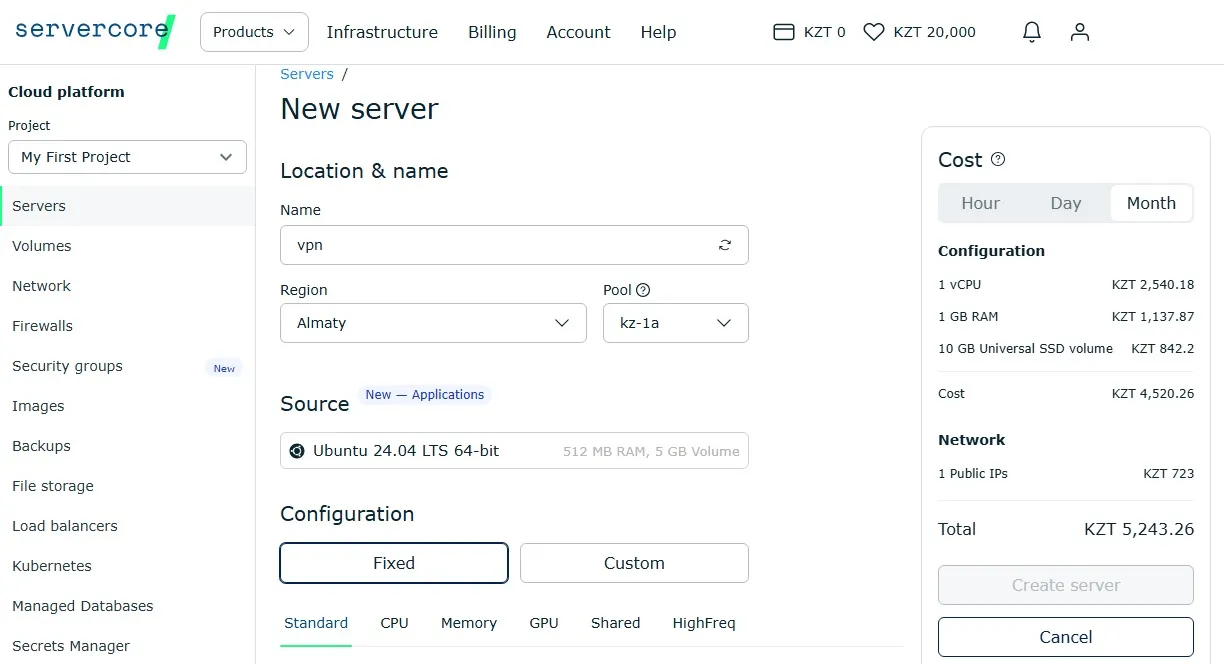
A virtual server gives you full control over infrastructure and settings, ensuring a high level of security. Servercore offers ready-made virtual machine images that allow you to quickly set up VPN. Users receive a virtual server with pre-installed OS images and a dedicated public IP address.
Steps to configure VPN with Servercore.
Deploy a cloud server from Servercore.
- Install the VPN protocol — use OpenVPN (sudo apt install openvpn) or WireGuard (sudo apt install wireguard).
- Configure VPN — set encryption keys and server parameters.
- Define user access rights.
- Download client files — create .ovpn or .conf files for connecting devices.
- Connect clients — import configuration files into VPN clients on Windows, macOS, or mobile devices.
Conclusion
VPN has long become a key tool for ensuring security and privacy on the internet. Modern solutions offer encryption protocols adapted for different use cases — from secure remote access in corporate networks to protecting mobile traffic. However, it's important to consider the technology's limitations, including possible data leaks from unreliable providers and reduced connection speed.
For those who want maximum control over their network security, the optimal solution is to deploy your own VPN server. This ensures complete transparency of the service operation and flexibility in security configuration. Servercore offers convenient server solutions suitable for creating VPN infrastructure of any scale.