 English
 Русский
If you want to understand what VPN is — read our article. In it, we explained in simple terms what Virtual Private Network means, why to connect via VPN, and which type of connection is better to choose.
VPN — What is it
VPN (Virtual Private Network) — is a technology that allows establishing an encrypted secure connection on the internet through connection to a virtual private network.
Thanks to connecting to a virtual private network (VPN decryption), you can establish one or several secure network connections over or within another unprotected network. This ensures confidentiality of user actions on the internet (following links, watching videos, and so on).
Why VPN is needed
The main goal of connecting via VPN is increasing security on the internet. This is important and necessary for several reasons.
Firstly, all our actions on the internet are tracked and analyzed by various services. Data about location, interests, and user behavior is collected for various purposes (for example, marketing). Search engines learn and remember all available information about us. A simple example — every website you visit automatically receives information about your geographical location. How is this possible?
The thing is that every device used to access the internet has a unique address on the network — an IP address. It serves for searching, transmitting, and receiving information from one computer to another — without it, information exchange is impossible. It is the IP address that allows determining the user's location. Consequently, every time you go online from some device, you allow internet resources to collect information about you.
Secondly, any information we leave when interacting with websites and other users on the internet (passwords, bank card numbers, passport data) is of interest to attackers. Fraudsters regularly intercept the information they need and constantly improve their data theft methods.
These risks cannot be reduced to zero, but they can be significantly reduced. With a VPN connection, you are actually connecting to the internet from your device, but from a technical point of view, the connection is established in a dedicated private environment. The user is assigned a random IP address from the list of all addresses in this environment. Thus, VPN encrypts your actions on the internet — it's as if you are connecting from another device.
Thus, VPN performs two main functions:
- Hides the true source of connection — changes your real IP address to a random address belonging to one of the private networks.
- Encrypts the connection — allows you to perform actions on the internet not directly through the provider, but through an encrypted channel.
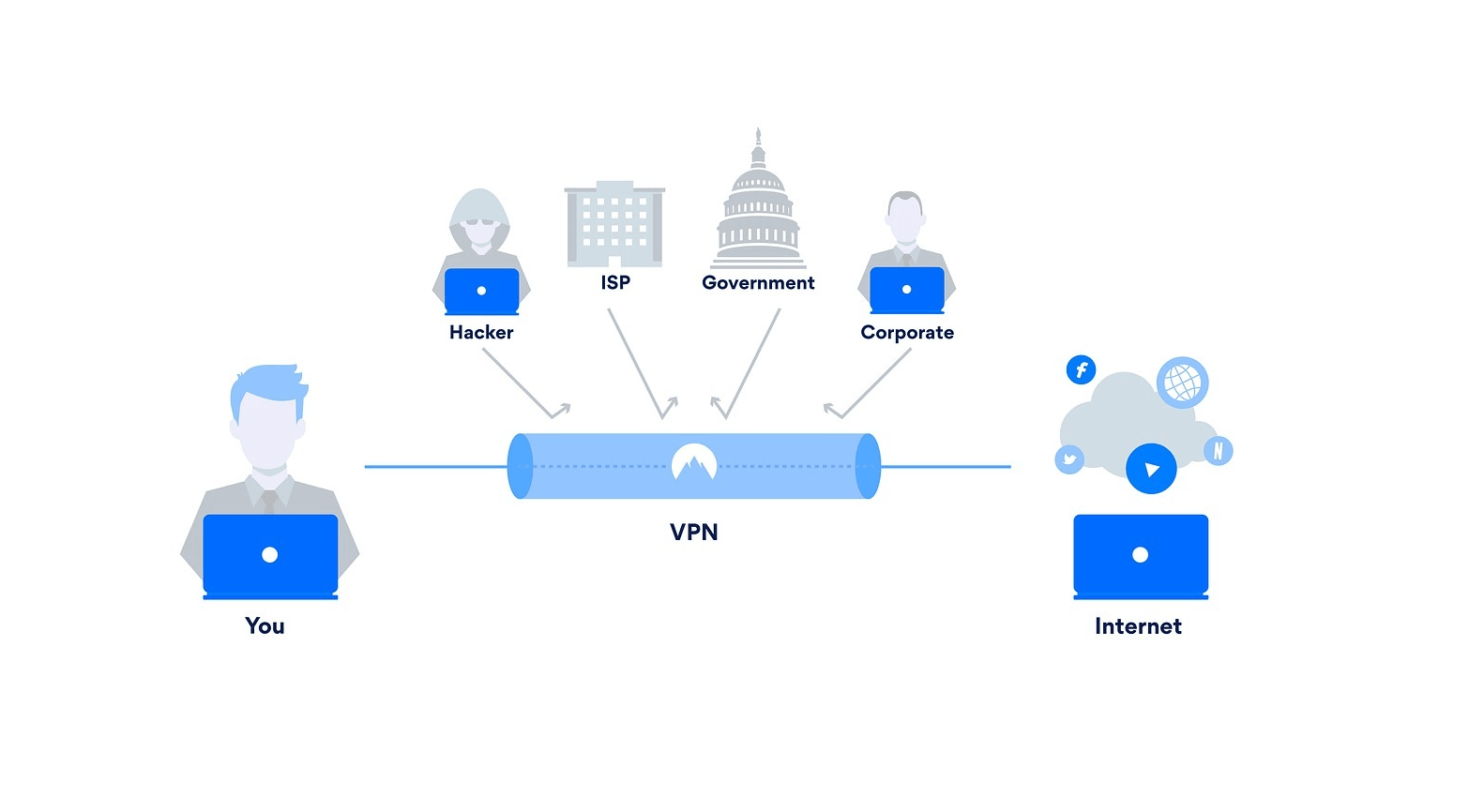
How to use VPN in practice, we described in the examples below:
- Remote network connection. With VPN, you can connect to your home network from anywhere in the world. Or conversely — safely connect to a corporate network in case of remote work from home. In large organizations, such connection is a mandatory requirement — otherwise, you simply won't get access to any services or documents.
- Hiding the chain of actions on the internet. Almost every website and online store analyzes user actions. Most often, data collection is needed to offer, advertise, and often impose their services or products on users. Thanks to VPN, you can reduce the flow of spam and unwanted advertising.
- Data protection when using the internet in public places. Any connection to public Wi-Fi is a risk. The thing is that public networks do not provide sufficient protection for data transmitted within them. When connecting to a public network, your passwords, card numbers, and other information can be intercepted by an attacker at any moment. Under VPN, when trying to access your data, a fraudster will "bump into" a private network and won't be able to do anything.
Let's take a closer look at how a secure VPN connection works at the technical level.
How VPN works
If a user uses VPN when connecting to the internet, they don't immediately get to the desired resource or website, but access information as if through an intermediary. How it works:
- The user connects via VPN — at this moment, a connection with the private virtual network is established.
- Then the user enters a query or performs one of the transactions. At this moment, the private network builds a secure channel: it selects a random IP address and intercepts your query. Thanks to the VPN server, the private network processes it itself — makes a request/connects to the desired website.
- The network receives the necessary information and confidentially transmits it to the user. This happens with every request.
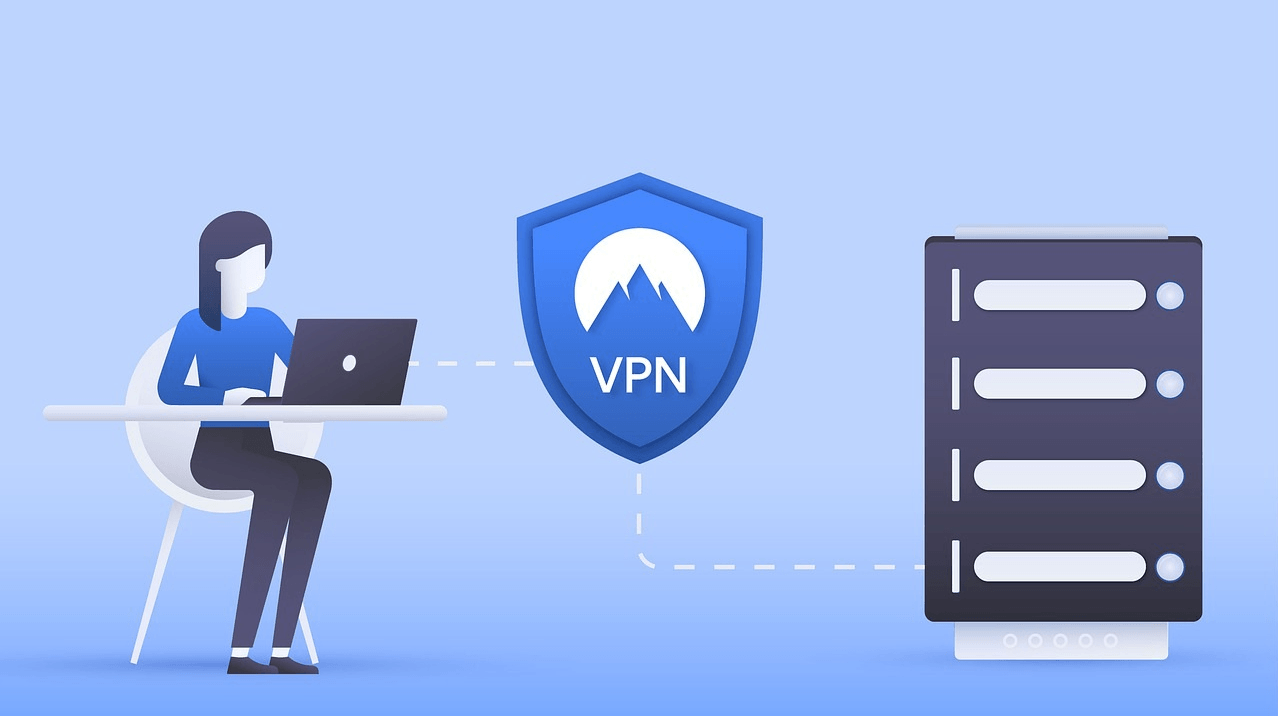
From the outside, for the user, this entire path is invisible, as the quality and speed of the internet practically doesn't change. At the same time, from the inside, the differences in connecting with and without VPN are fundamental — if someone tries to track the chain of your actions on the internet, they simply won't be able to establish their authenticity and the source of connection.
Main types of connections
The basis of any secure connection is the operation of one of the security protocols. Depending on the protocol used to implement VPN technology, several types of connections can be distinguished. Each of them provides a different level of protection and is suitable for different purposes.
PPTP (Point-to-Point Tunneling Protocol) — this is the first VPN protocol, developed in the 90s. It works on the principle of forming tunnels through which data exchange occurs. These tunnels are laid strictly point-to-point through an unprotected network. PPTP has a fundamental vulnerability — it doesn't encrypt data. Obviously, such a VPN connection is suitable only for low-level tasks. For example, it's used when transmitting streaming audio or video in applications.
L2TP (Layer 2 Tunneling Protocol) — developed by Microsoft together with Cisco. Like PPTP, it functions on the principle of forming tunnels and doesn't encrypt information. However, L2TP can work in conjunction with other protocols — for example, IPsec. In such a combination, L2TP is responsible for the integrity of transmitted information, and the second protocol is responsible for data encryption. Together they form a complete and secure connection.
IPsec (Internet Protocol Security) — this is a protocol with which you can lay a tunnel to a remote node. IPsec provides a high level of connection security — all data packets are encrypted, each session is checked. There are two modes in which IPsec operates: transport and tunnel. Both serve to protect data transmission between different networks. At the same time, in transport mode, any message is encrypted in the data packet, and in tunnel mode, the entire data packet is encrypted. IPsec is often used in addition to other protocols to increase network security. The main disadvantage of IPsec — it takes a long time to install and connect client applications.
Site-To-Site VPN — designed to connect organizational networks. It connects two parts of a private network or two private networks. This is the most common type of connection when setting up a reliable corporate network. Site-To-Site allows an organization to route connections with individual offices or with other organizations. A routed VPN connection logically works like a dedicated wide area network (WAN).
MPLS (Multiprotocol Label Switching) — this is a multiprotocol switching technology (connecting network subscribers through transit nodes). In a network based on MPLS, data packets are assigned labels. The decision to transfer a data packet to another network node is made based on the label value — the data packet itself is not examined. Due to this, independent of the transmission medium, you can create an end-to-end virtual channel. MPLS is a very flexible and adaptive VPN option, which makes it ideal for site-to-site connections.
How to choose a VPN
At the very beginning of its development, VPN technology was completely paid. Now you can set up both a paid secure network and use free VPN services. To determine whether you need a paid or free service, first of all, you need to decide what level of security you want to get from VPN. Whether you are a small business owner, a large company, or a student — your requirements will differ.
If you've already decided on the main thing, pay attention to three additional criteria.
Operating speed — this is perhaps the most important criterion after reliability. If using VPN affects the page loading speed when connecting to the network — this is a bad sign. Quality services allow you to browse websites at the usual provider speed. Of course, the loading speed can change, but only occasionally and insignificantly.
Convenience in connection. If you plan to regularly use VPN, it's worth making sure that the service is convenient to use. If you need to perform many steps each time to connect — this is a reason to consider other options.
Ability to contact support. Regardless of whether you prefer a paid or free type of connection, pay attention to the quality of the support service. In case of problems with settings or in an emergency situation, specialists should provide a clear action plan.
⌘⌘⌘
So, we told you about virtual private networks — what they were invented for, how they work, and how to properly choose a VPN service. Now you understand what VPN technology is and will be able to choose a suitable service to protect confidentiality.